

AI essay grading tools are no longer experimental. Teachers are using them right now to get through stacks of 100+ essays in a fraction of the time, and school districts are starting to adopt them at scale. The question isn't whether AI grading works — it's which tool actually fits how you teach.
The problem is, most "comparison" articles are written by the tools themselves. You get a landing page disguised as a blog post. So here's an honest breakdown — what each tool does well, where it falls short, and who it's actually built for. Full disclosure: I'm the founder of AutoMark, so I'm obviously biased. But I'll try to be fair, and I'll tell you when a competitor does something better than we do.
The Tools We're Comparing
Five AI essay grading tools are getting the most attention from teachers right now:
Turnitin — the 800-pound gorilla. Known for plagiarism detection, now expanding into AI grading and AI writing detection.
Gradescope — owned by Turnitin, but a separate product. Focused on rubric-based grading with AI-assisted answer grouping. Popular in higher ed.
CoGrader — a lightweight, Google Classroom-native grading tool. Free tier, popular with individual teachers.
EssayGrader — a freemium AI grading platform with a large rubric library and student analytics. Growing fast at 30,000+ educators.
AutoMark — that's us. Rubric-based AI essay grading with Canvas, Google Classroom, and Brightspace integration. 250,000+ essays graded, 97% agreement rate with human graders.
Let's break each one down.
Turnitin
Turnitin needs no introduction. If you've taught in the last decade, your school probably has a Turnitin license. Their core business is plagiarism detection, but they've been pushing into AI territory — both detecting AI-written content and, more recently, assisting with grading.
What it does well: Turnitin's AI writing detection is the most widely deployed in education. Their February 2026 update added signal decomposition and rationale overlays, so you can see why the system flagged something as AI-generated. If your primary concern is academic integrity rather than grading speed, Turnitin is the most mature option.
Where it falls short for grading: Turnitin's AI grading features are still secondary to their detection tools. The grading assistance is primarily available through Gradescope (see below), not the core Turnitin product. If you're looking for a tool that grades essays end-to-end against your rubric, Turnitin alone won't do that.
Pricing: Enterprise-only. Your school or district negotiates a contract, typically in the range of $3-7 per student per year. Individual teachers can't buy it.
LMS support: Canvas, Google Classroom, Blackboard, and others via LTI.
Best for: Schools that already have a Turnitin license and want to add AI detection on top. Not the right choice if your primary goal is faster grading.
Gradescope
Gradescope is Turnitin's grading-focused product. It's popular in higher education and increasingly in high schools. The core idea is rubric-based grading with AI that groups similar student answers together, so you can grade clusters of responses at once instead of one at a time.
What it does well: The answer grouping feature is genuinely clever. For assignments where many students write similar things (think short-answer questions or formulaic essay structures), it lets you grade a group in one click and apply that score to everyone with a similar response. The rubric system is solid, with dynamic rubrics that auto-update previously graded work when you change a criterion. It also handles paper submission scanning if you still collect physical papers.
Where it falls short: Gradescope's AI features are strongest with fixed-template PDFs and structured assignments. For open-ended essays where every response is substantially different, the answer grouping is less useful. It's also institution-only pricing with no individual teacher plans — if your school doesn't have a license, you're out of luck.
Pricing: Custom institutional pricing, FTE-based. Not publicly listed.
LMS support: Canvas, Blackboard, Google Classroom via LTI.
Best for: Universities and large high schools with structured assignments, TAs who need calibration tools, and schools that still work with paper submissions. Less ideal for individual teachers or open-ended essay grading.
CoGrader
CoGrader is the scrappy competitor that's gotten popular with individual teachers, especially at the middle and high school level. It's Google Classroom-native and has a generous free tier.
What it does well: The Google Classroom integration is seamless — import essays, grade them, and export scores back without leaving the tool. CoGrader offers standards-aligned rubrics for narrative, informative, and argumentative essays out of the box. The free tier gives you 100 essays per month, which is enough for many teachers to use it without paying anything. And the teacher review step is built in — you're not blindly auto-grading.
Where it falls short: CoGrader is Google Classroom-first. If your school runs Canvas or Brightspace, it's a less natural fit. The rubric system, while functional, is less flexible than what you'd get with Gradescope or AutoMark — it works best with the standard essay types it was designed for. And the feedback customization has some limits compared to tools that let you write and edit AI-suggested comments at the line level.
Pricing: Free for up to 100 essays/month. $15/month for unlimited. School/district pricing available on request.
LMS support: Google Classroom (primary), Canvas and Schoology (secondary).
Best for: Individual middle and high school teachers on Google Classroom who want a simple, free-to-start grading assistant. If your needs are straightforward (grade argumentative essays against a standard rubric), CoGrader gets the job done at a hard-to-beat price.
EssayGrader
EssayGrader (essaygrader.ai) has grown fast — they report 30,000+ educators on the platform. It's a freemium tool with AI grading, a large rubric library, and built-in AI detection and plagiarism checking.
What it does well: The rubric library is impressive — 500+ pre-built rubrics aligned with state, national, and international standards. If you don't want to build your own rubric from scratch, EssayGrader probably has something close to what you need. The student analytics are also a strength — you can track individual student writing performance over time, which is useful for intervention planning. And bundling AI detection with grading means one less tool in your workflow.
Where it falls short: The free tier is tight — 25 essays per month. For a teacher with 120 students, that's not even one assignment. The LMS integration is limited to Google Classroom and Canvas with basic upload/download, not the deep LTI integration you'd get with Turnitin or AutoMark. And while the feedback is detailed, the line-by-line annotation system isn't as developed as some competitors.
Pricing: Free for 25 essays/month. $6.99/month (Lite, 100 essays). $14.99/month (Pro, unlimited).
LMS support: Google Classroom and Canvas.
Best for: Individual teachers who want a low-cost all-in-one tool (grading + AI detection + plagiarism checking) and value a large rubric library. Good for teachers who are building their rubric practice and want pre-built starting points.
AutoMark
This is us, so I'll be upfront about what I think we do well and where we have gaps.
What we do well: Our core strength is rubric-based essay grading where the teacher stays in control of every score. The AI reads each essay against your rubric criteria and suggests a score with line-by-line feedback. You review and edit everything before it goes to students. Our 97% agreement rate (measured on double-scored essays) means the review step usually confirms rather than corrects — but you always have the final say.
We support batch grading, which means you upload a full class set and get everything back at once instead of grading one at a time. The LMS integrations are deep — Canvas, Google Classroom, and Brightspace with automatic grade sync back to your gradebook. And our pricing model works for both individual teachers ($35 for a credit pack) and schools (unlimited plans starting at $99/month for departments).
Where we fall short: We don't have built-in plagiarism detection or AI writing detection. If that's important to you, you'd need to pair AutoMark with a separate tool like Turnitin or use your LMS's built-in detection. Our rubric library is smaller than EssayGrader's — we have templates, but we're not at 500+ yet. And we're newer than the established players, which means a smaller support knowledge base and community.
Pricing: Individual credits start at $35 for 500 essays. Department plans start at $99/month (up to 15 teachers, unlimited credits). School and district plans are custom.
LMS support: Canvas, Google Classroom, Brightspace. LTI 1.3 integration.
Best for: Teachers and schools that want rubric-based essay grading with deep LMS integration and a teacher-in-the-loop workflow. Especially strong for ELA departments running batch grading across sections.
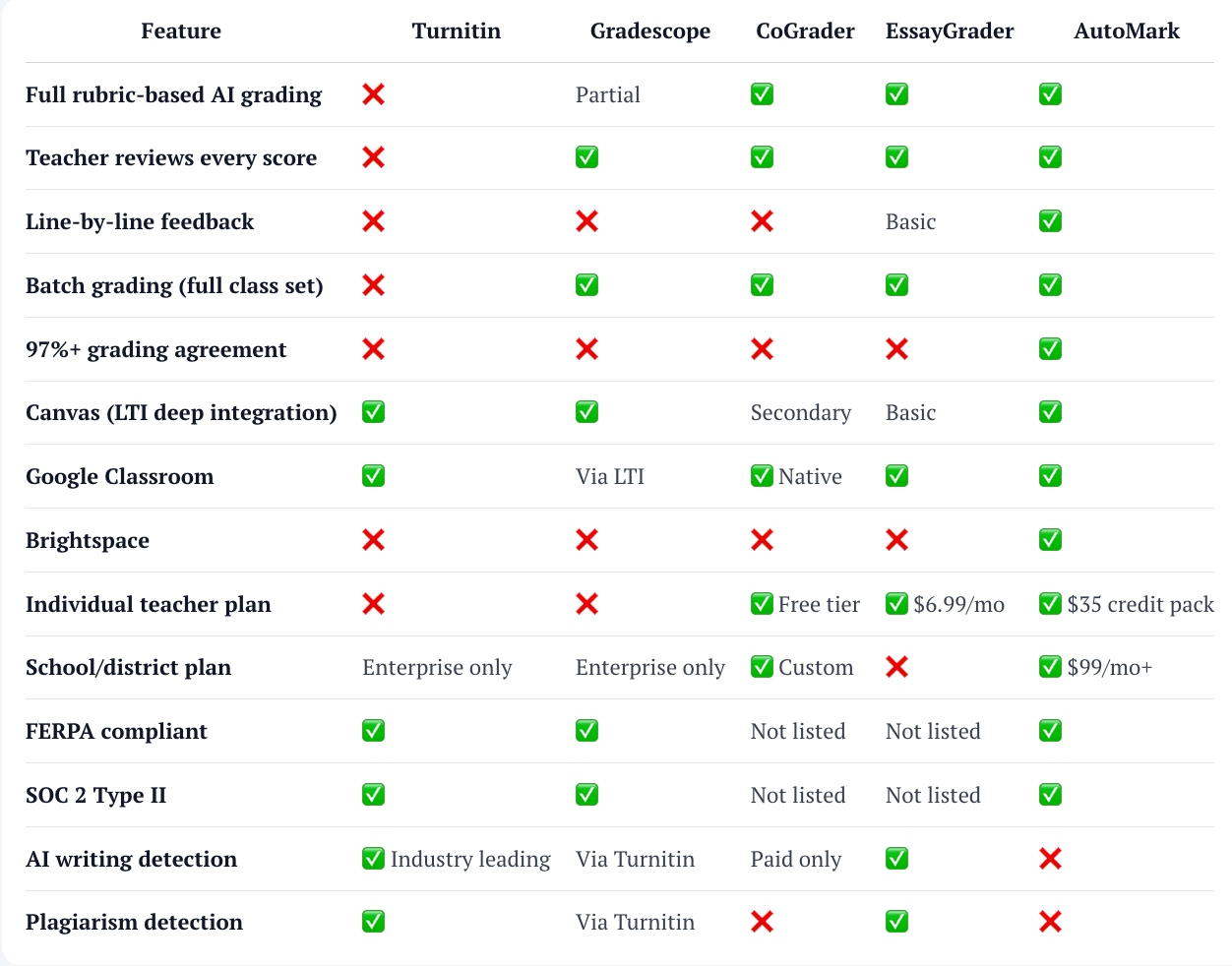
How They Compare Side by Side
| Feature | Turnitin | Gradescope | CoGrader | EssayGrader | AutoMark |
|---|---|---|---|---|---|
| Full rubric-based AI grading | ❌ | Partial | ✅ | ✅ | ✅ |
| Teacher reviews every score | ❌ | ✅ | ✅ | ✅ | ✅ |
| Line-by-line feedback | ❌ | ❌ | ❌ | Basic | ✅ |
| Batch grading (full class set) | ❌ | ✅ | ✅ | ✅ | ✅ |
| 97%+ grading agreement | ❌ | ❌ | ❌ | ❌ | ✅ |
| Canvas (LTI deep integration) | ✅ | ✅ | Secondary | Basic | ✅ |
| Google Classroom | ✅ | Via LTI | ✅ Native | ✅ | ✅ |
| Brightspace | ❌ | ❌ | ❌ | ❌ | ✅ |
| Individual teacher plan | ❌ | ❌ | ✅ Free tier | ✅ $6.99/mo | ✅ $35 credit pack |
| School/district plan | Enterprise only | Enterprise only | ✅ Custom | ❌ | ✅ $99/mo+ |
| FERPA compliant | ✅ | ✅ | Not listed | Not listed | ✅ |
| SOC 2 Type II | ✅ | ✅ | Not listed | Not listed | ✅ |
| AI writing detection | ✅ Industry leading | Via Turnitin | Paid only | ✅ | ❌ |
| Plagiarism detection | ✅ | Via Turnitin | ❌ | ✅ | ❌ |
So Which One Should You Use?
There's no single "best" tool — it depends on what you need.
If your school already has Turnitin and you mainly need AI writing detection with some grading assistance, stick with what you have and add Gradescope if your institution offers it. The integration between the two products is seamless, and switching costs are high.
If you're an individual teacher on Google Classroom and want the simplest, cheapest way to start with AI grading, CoGrader is hard to beat. The free tier is generous enough to try it for real, and the Google Classroom integration is the most natural of any tool.
If you want an all-in-one tool that combines grading, AI detection, and plagiarism checking in a single platform, EssayGrader covers the most ground. The rubric library is a real time-saver if you're still developing your rubric practice.
If you're a school or department looking to roll out AI grading across multiple teachers with Canvas or Brightspace, AutoMark is built for that use case. The LMS integrations are deeper, the school pricing is designed for team adoption, and the admin dashboard gives department heads visibility into usage.
If rubric accuracy and teacher control are your top priorities — meaning you want the AI to be right 97% of the time and you want to review every score before students see it — that's where AutoMark's grading engine is strongest. We built the product around the teacher-in-the-loop workflow specifically because we think that's how AI grading should work.
The Bigger Picture
AI essay grading is still early. Every tool on this list will look different in a year. What matters now is finding one that fits your current workflow, testing it with real student work, and seeing if the output meets your standards.
The teachers who are getting the most out of these tools aren't the ones who blindly trust AI output. They're the ones who use AI as a first pass — a draft grader that handles the mechanical evaluation — and then apply their own expertise in the review step. That workflow works regardless of which tool you pick.
If you're not sure where to start, try the free tiers. CoGrader gives you 100 essays free. EssayGrader gives you 25. AutoMark lets you try grading a sample essay right now without even signing up.
And if you're a school leader thinking about this for your department or district, we have a page specifically for you that covers team pricing, LMS setup, and security compliance.
Ready to see how AutoMark handles your rubric? Try it free — paste an essay and watch it grade in seconds.
For more on AI grading, read AI Grading vs Manual Grading: An Honest Comparison and How Teachers Are Grading Midterms 3x Faster.